Why not a theme
A theme changes what a diagram is coloured with. What is wrong with most Mermaid diagrams is where things are. That is the whole answer. The rest of this page is the evidence, and what Merlive does instead.
What a theme can change
Mermaid comes with a list of themes (default, neutral, dark, forest, neo, redux and more), and base, which takes your own colours, a variable at a time. There is a hand-drawn look as well. All of it sets colours, a typeface and the stroke of a line.
None of it moves a box. You can see this for yourself: Try it has Mermaid's theme picker over Mermaid's side. Change the theme, and every box stays exactly where it was.
What is wrong is where things are
Here is one block of Mermaid, drawn by Mermaid as it comes and by Merlive.
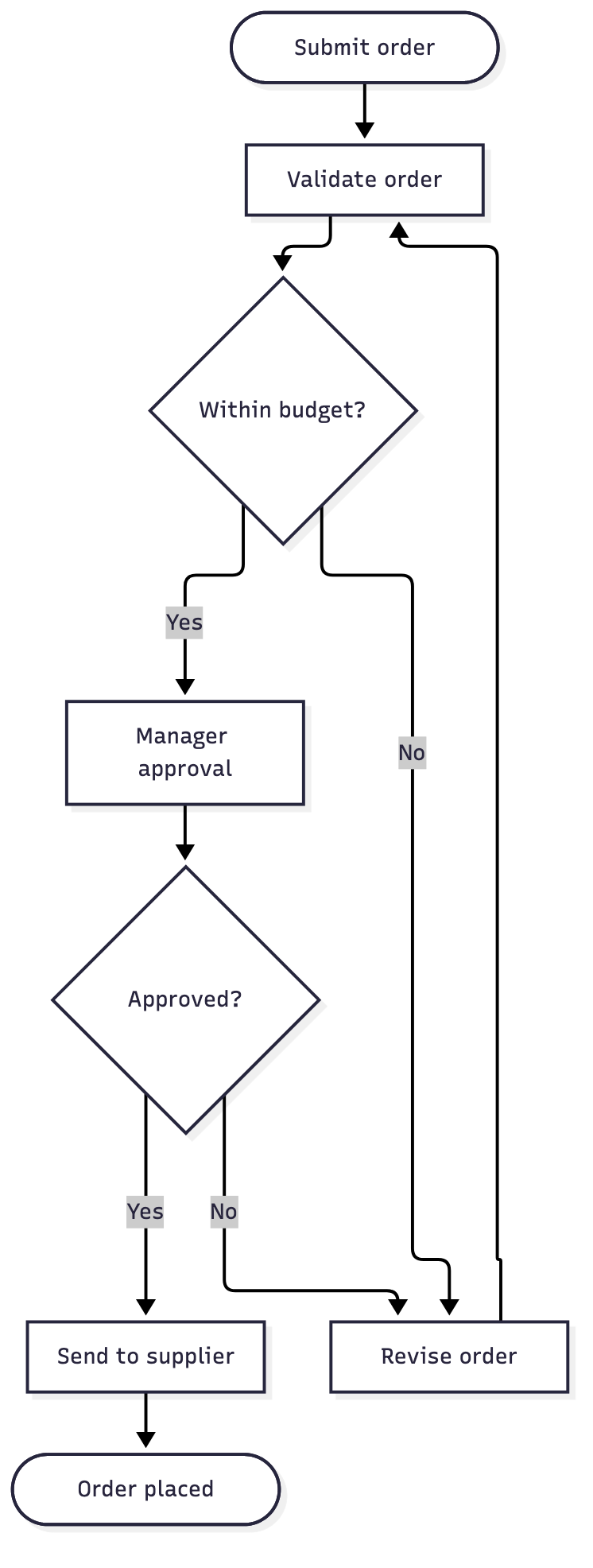

Look at Mermaid's side and count what a theme could fix.
- A decision is a diamond twice the size of the boxes round it. Mermaid draws a rhombus round its words, so it grows both ways. The least important thing to look at, a question, is the biggest thing on the page.
- The main path wanders. From Submit order to Order placed is the normal case, and it zigzags, because nothing in a flowchart says which path is the main one, and the layout is not looking for one.
- No two boxes are one size. Each is as wide as its words. Nothing lines up, so nothing reads as a row or a column.
- The ways back run the length of the page. Revise order sits off to one side at the foot, and its line back to Validate order climbs the whole height of the diagram.
- Words sit on their lines. Yes and No are written across the line they belong to.
Not one of these is a colour. A darker theme gives you the same diagram, darker.
Mermaid's own placement has got better. Version 12 lays a diagram out with ELK as it comes, where 11 used dagre, and its lines turn at right angles now where they used to curve. The drawing above is that one. It is still an engine for graphs in general: it does not know which path a reader should find first, it does not make boxes one size, and nothing checks what it made.
So Merlive places, by rules it checks
| What you want | A theme | Merlive |
|---|---|---|
| The main path in one straight line | Cannot | Rule P1. The longest path that takes no exception, or the one you name with %% main: |
| Boxes of one size, on a grid | Cannot | Rule P2. A rhombus, a cylinder or a hexagon is still the shape you wrote, in the footprint every box shares |
| No line through a box, no two lines on one path | Cannot | Rules P3 and P5. Lines turn at right angles, each with a port of its own, and go round boxes |
| As few crossings as the diagram allows | Cannot | Rule P4, counted exactly |
| Words that fit their box, and a link's words clear of everything | Cannot | Rules P6 and P7 |
| A group's name you can read | Cannot | Rule P8 |
| Colours that are yours | You set them, one variable at a time | Read from your own site, once, with nothing asked |
| Words that can be read against what is behind them | Not checked | Rule D1, checked on every design |
| Kinds of box that can be told apart, also without red and green | Not checked | Rule D2, checked for ordinary and colour-blind sight |
| Something a reader can use | A picture | A page: pick a box to see what it connects to, and walk the steps its author wrote |
A diagram that breaks a rule is not written. The message names the rule, the place, and what to change in the Mermaid. The rules, each with what passes and what fails.
Why Merlive has no themes of its own, either
Most tools that make diagrams look better do it with a list of themes to pick from. Pick one, and your diagrams look like that tool. They do not look like your site, your docs or your blog, which is where they will sit.
Merlive has no list. Once for a project, it reads the site your diagrams will be read on: the project's own stylesheet, or an address you give it. It takes the page and text colours, the accent, the typeface, the face code is set in, the corner, and whether there is a dark mode. What a diagram needs and a site does not have (a box's fill and edge, lines, the colours for kinds of box) it makes from those.
Then it holds the result to two rules, because a colour that suits a button may not suit a line. What it reads and would fail, it puts right and tells you. This site's marigold is 1.6 to 1 on white, too faint for a line, so the diagrams on these pages use the same hue made darker, and setup said so when it ran.
You never type a colour code, and you never choose from someone else's palette. What is left to choose is taste, not colour: how much may move, whether boxes lift off the page, a live page or a still picture. How it finds your colours.
Beside the other ways to a better diagram
Each of these is a good answer to a different question. This is the question Merlive answers: the diagrams are already written in Mermaid, in Markdown, and they should stay that way.
| The way | What it is good at | What it asks of you | How Merlive differs |
|---|---|---|---|
| A Mermaid theme or look | Colours and a typeface, anywhere Mermaid renders | Colours set by hand, a variable at a time | Changes where things are, which a theme cannot. Reads the colours instead of asking for them |
| Mermaid's own layout engines, dagre and ELK | A sound placement of any graph, with nothing to do | Nothing, and it gives you no say: no main path, no rule to hold it to | Places for a reader, by named rules, and refuses what breaks one. Boxes are one size |
| Another renderer for Mermaid, such as beautiful-mermaid | A cleaner drawing of the same Mermaid, with themes kept as a few values | Picking one of its themes, or giving it colours | No themes to pick. The design is your site's, and it is checked for contrast and for colour-blind readers |
| Another diagram language, such as D2, Structurizr or Ilograph | A language made for layout, layers or walkthroughs | Writing every diagram again, in something Markdown hosts do not draw | Your Mermaid stays the source, unchanged. It still renders on GitHub and everywhere else Mermaid does |
| A drawing tool, such as Excalidraw or draw.io | Exactly the picture you want | Placing every box by hand, and again whenever the diagram changes | Nobody places a box. Change the text and draw again |
Merlive borrowed from several of them, and says so: steps a reader can walk and "pick a thing, see only what it touches" from Ilograph, flows played over a diagram that is already there from IcePanel, a legend made for you from Structurizr, colours kept as a few values from beautiful-mermaid, a still version for where a page cannot go from D2. What was borrowed, and from where.
What is Merlive's own: Mermaid stays the source of truth, placement is by named rule, nothing is configured by hand, and the colours are yours, read from your site and checked before anything is drawn in them.
When to leave a diagram as Mermaid
- Three or four boxes with nothing to step through. A live page adds nothing there, and the skill tells your agent so.
- A kind Merlive does not draw. Gantt, pie and the other charts are left exactly as you wrote them, and named. What it draws.
- Where a diagram has to be drawn by the host, in a README on GitHub say. Your Mermaid is never changed, so it still does. Merlive's page or picture sits beside it, for the places that can show one.
What it will not become
- A diagram editor. The Mermaid is edited as text. Merlive never asks anyone to drag a box.
- A second diagram language. What you can add are comments in the Mermaid, which every other renderer ignores. There are a handful.
Written from site/pages/why.md in the repository, so the two cannot disagree.